

Step 6 – Analysis Views with Copilot
Author: Kim Dallefeld, MVP, MCT, MCP
I’m a big fan of Analyze Mode and admittedly not very good at developing views. My best suggestion is just keep trying and use the Business Central Documentation which gives you good examples to work you through so you can learn faster.
I wanted to see what I could do with Copilot and Analyze Mode. This has been a feature in BC for several versions and I have grown to love it! I am very much in the habit of just digging into the data to try to find what I want or need. And I’m not accustomed to asking for help.
I did ask Copilot to ‘summarize by customer name by item description quantity and dollars sold’ and it did just that!
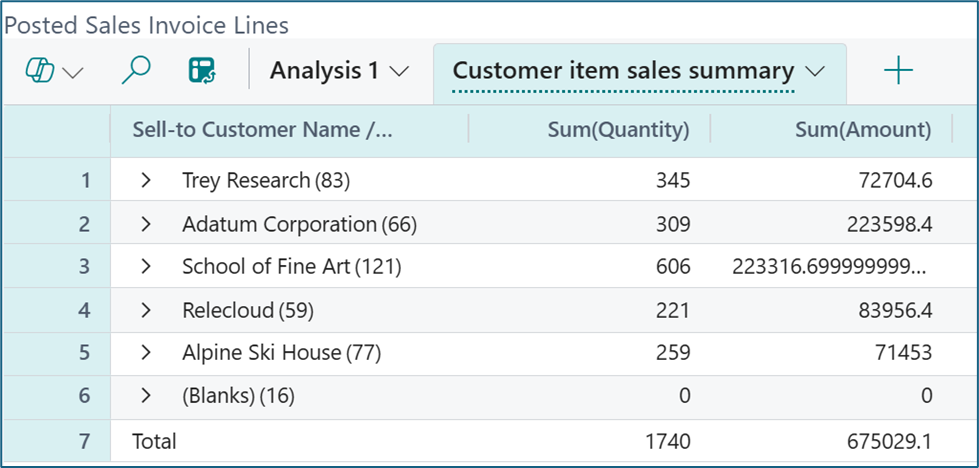
Did you notice that there are no item lines? Well, that’s because it is summarized by customer just like I asked. To see the item details, let’s expand School of Fine Arts:
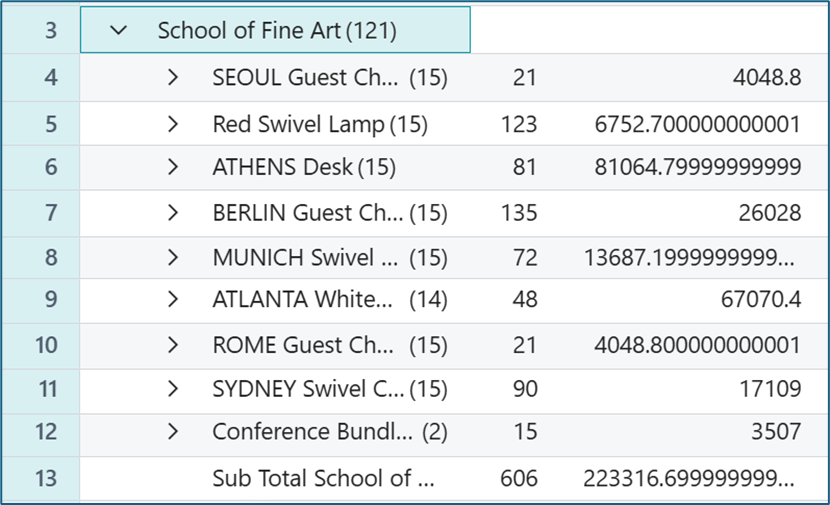
I could have been more specific and given a date range or other criteria but this is exactly the data that I was looking to review.
You can see the columns, row groups and values that Analysis Mode utilized and you can customize even further with Analysis filters.
This is a must try for all users!
Note: if you don’t get the right answers the first time, try, try again. You aren’t hurting anything when you’re building these views. Don’t forget to save it when you get the final version!