
Kim Dallefeld
Microsoft MVP | Business Central SME
Microsoft MVP | Business Central SME
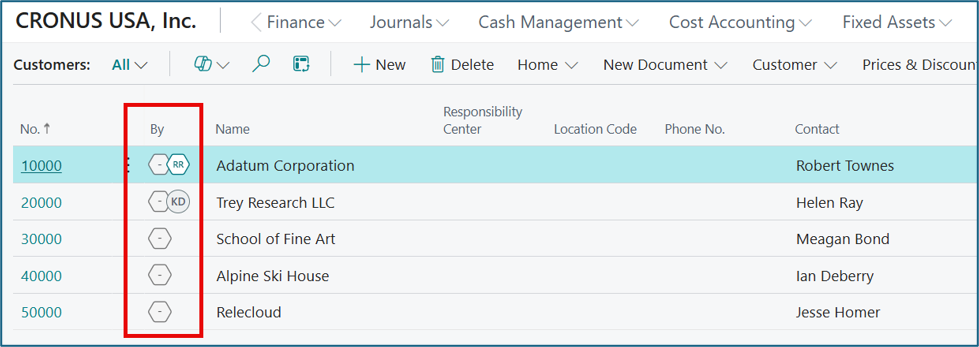
One of my favorite “small but mighty” features in Business Central v28 is the new record creator and modifier avatars.
I have to admit, the first time I saw avatars in Business Central, I smiled.
Here’s a scenario: You’re reviewing a customer, vendor, or item record and something doesn’t look quite right. The first question that comes to mind is:
“Who changed this?”
For years, the answer typically involved opening the record, reviewing audit information, or digging through change log entries. With Business Central v28, that information is now visible at a glance. Users can display avatars that identify who created a record and who last modified it, directly from supported list pages.
Is it a massive game-changing feature? No.
Is it one of those practical enhancements that saves a few clicks, reduces frustration, and answers a common question instantly? Absolutely.
And those are often the features users end up loving the most.
🦸 Avatar Kim Says…
“Stop searching through change logs and start solving mysteries faster!”
Business Central v28 puts record ownership front and center by displaying avatars for the users, system accounts, or AI agents that created or modified records. Sometimes the best enhancements are the ones that simply make your day a little easier.
1. What Are Business Central Avatars?
Business Central v28 introduces avatars that display the user or agent responsible for creating and modifying records. These avatars appear directly on supported list pages, giving users immediate visibility into record ownership and activity. Simply hover over an avatar to view additional details about the user and the most recent update.
2. Why Microsoft Added Them
At first glance, avatars may seem like a cosmetic enhancement, but they solve a very real business problem.
By displaying ownership information directly on the page, users can quickly determine who created a record, who updated it last, and who might have the context needed to answer questions. This improves collaboration, reduces time spent searching for information, and adds transparency when multiple users are working in the same data.
Instead of asking, “Who changed this customer?” the answer is often right in front of you.
3. My Favorite Real-World Uses
The Mystery Solver
A record looks different today than it did yesterday. Instead of launching an investigation, I can immediately see who last touched the record.
The Department Detective
Need to know who entered a new customer, vendor, or item? The avatar points you directly to the person most likely to have the answer.
The AI Spotter
As organizations begin leveraging AI Agents in Business Central, avatars can also help identify records that were updated by an automated process instead of a human user.
4. Small Feature, Big Time Saver
One of the reasons I like this enhancement so much is its simplicity.
There are no complicated setup projects, no customizations to develop, and no third-party extensions to install. It’s a straightforward feature that delivers immediate value while making Business Central feel more modern and collaborative.
5. Bonus Tip: Use Tile View
I find avatars much easier to see when working in Tile View. This is especially useful on Financial Reports and other frequently accessed areas where ownership and status information are important. The additional space makes the avatars more visible and easier to interpret at a glance.
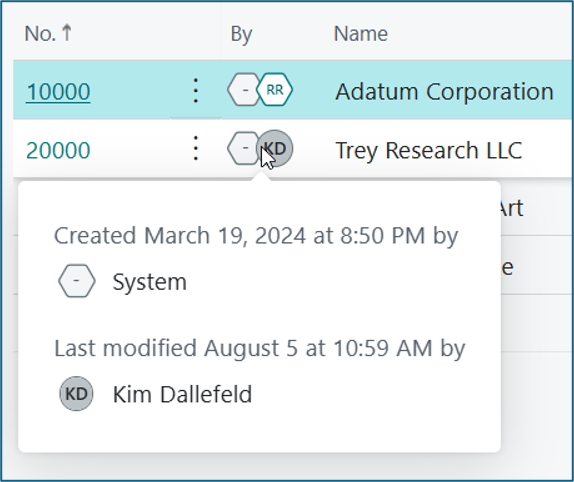
After years of helping customers figure out who created or modified records, I love that Business Central now makes this information visible with a single glance.
It’s not the biggest feature in v28. It won’t generate headlines or be the focus of conference keynote sessions.
But it is exactly the kind of enhancement that improves the everyday user experience.
And if it helps me avoid one more Teams message that starts with:
“Hey Kim, do you know who changed this record?”
then I’d call it a win.
Have you started using Avatars in Business Central v28? What’s your favorite “small but mighty” feature in the latest release? Let me know in the comments!