
Kim’s Korner · Hiding in Plain Sight, Article 3 of 7 | By Kim Dallefeld, Microsoft MVP
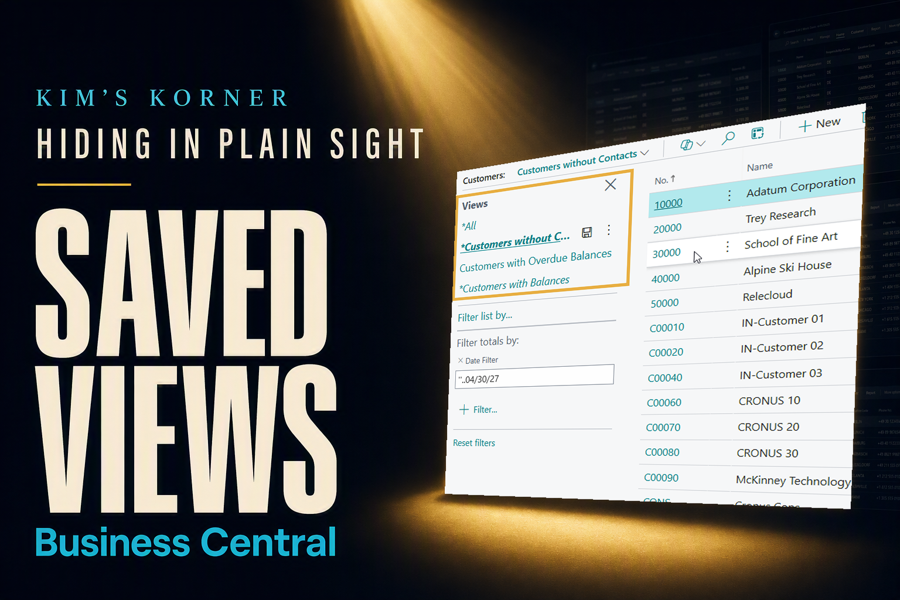
Every Monday morning, somewhere in your organization, someone opens a list page and applies the same four filters they applied last Monday.
Open the list. Filter to the responsibility center. Filter out the closed entries. Set the balance to greater than zero. Sort by amount, largest first. Answer the question, close the page, and watch every bit of that arrangement evaporate.
None of it is difficult, and that is exactly why nobody complains. It costs ninety seconds, so it never makes anyone’s list of problems. It also happens several hundred times a year across a team, and nobody ever adds that up.
What Saved Views actually are
A view is a saved arrangement of a list page. The filters you applied, the sort you chose, the columns you added or moved, all captured under a name you pick. It appears in the pane on the left side of the page, and one click puts you back exactly where you were.
Business Central ships with a few of these already in place, which is why most users assume the pane belongs to Microsoft and leave it alone. It does not. You can add your own, name them in language your team actually uses, and delete them when they stop earning their keep.
On any list page you can:
- Save the current filters and sorting under a name of your choosing
- Keep the column layout you arranged, including columns you added
- Switch between views with a single click instead of refiltering
- Rename or remove views as the work changes
- Build separate views for separate roles, regions, or review routines
- Open a view and switch straight into Analysis Mode to summarize it
The Monday morning list
Here is the routine I use as an example with collections teams, because it looks the same in every organization I have worked with. Someone needs the open receivables over thirty days, for their region, sorted largest first, and they need it every single week.
The manual path is four filters and a sort, repeated weekly, forever. The saved path is this:
- Open the list page and apply the filters you want.
- Arrange the columns and sorting so the page reads the way you need it.
- Save the arrangement as a new view, with a name your team will recognize.
- Next Monday, click the name.
That is the entire feature. It is not clever, and it requires no training. What it requires is somebody noticing that the pane on the left is theirs to use.
Why this one pays off quietly
It removes a decision, not just keystrokes. The ninety seconds are real, but the more valuable thing you get back is not having to remember which four filters you used last time. Anyone who has rebuilt a filter and gotten a different answer than last month knows why that matters.
It standardizes what people look at. When three people on a team each build their own version of the aged receivables list, they will eventually disagree about the numbers, and the disagreement will be about filters rather than facts. One shared view ends that conversation permanently.
It outlasts the person who built it. Someone who leaves takes their filtering habits with them, and their replacement starts from scratch. A named view is institutional knowledge that stays in the system where the next person can find it.
It makes Analysis Mode stick. This is the connection most users miss. Save the view first, then analyze from it, and the summary you built last month is one click away instead of a rebuild. The two features were meant to be used together.
Where I use it most
Receivables and payables review is the obvious home for this. Every collections routine and every payment run starts with the same population, and that population deserves a name rather than a rebuild.
Item and inventory lists come next, particularly where a team is watching a subset of stock: items below reorder point, items at a specific location, items with no movement this quarter. These are the lists people rebuild constantly without noticing they are doing it.
Period-end routines are where I push hardest for saved views. A close checklist that says review the unposted entries is far weaker than one that says open the view named Unposted at Close. The second version tells someone exactly what to look at, and it looks the same every month.
Kim’s Quick Tip
If you have applied the same filter twice this week, save it. The test is not whether the filter was complicated. The test is whether you will need it again.
Final thoughts
Saved views are the least glamorous feature in this series. There is no clever mechanism to explain and no impressive demo to give. You filter a list, you name it, you click the name later.
What makes them worth an article is that the cost they remove is invisible. Nobody escalates a ninety-second annoyance. It simply repeats, quietly, across every user and every week, until it adds up to real time that never appears in anyone’s productivity discussion.
That is the pattern in every feature in this series. The expensive problems get solved because somebody complains. The cheap ones just keep costing you, because they never sound bad enough to fix.
What’s the filter you rebuild most often? #BusinessCentral #MSDyn365BC #Dynamics365 #Accounting