
Kim’s Korner · Hiding in Plain Sight, Article 2 of 7 | By Kim Dallefeld, Microsoft MVP
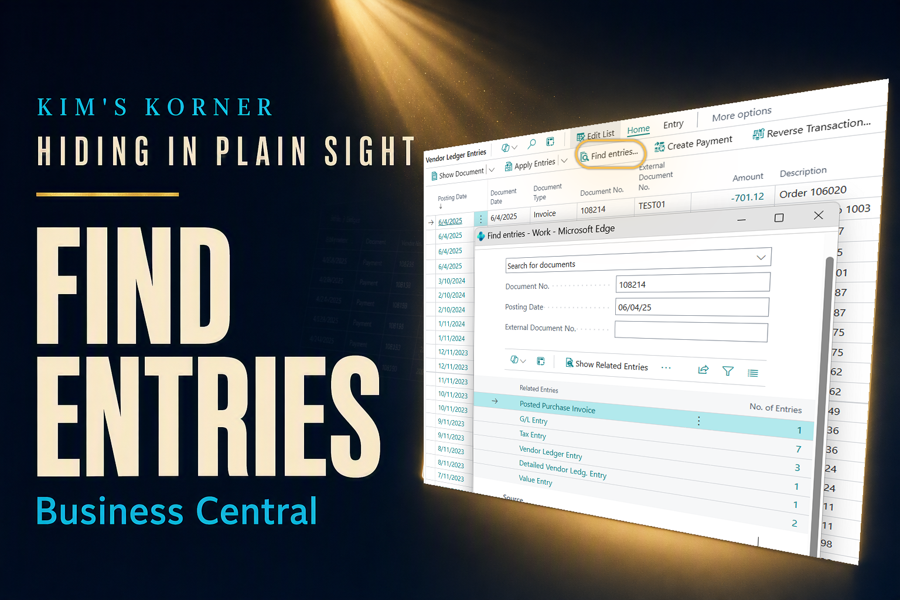
An auditor emails with a simple-sounding request. Show me everything connected to this invoice.
What follows is a scavenger hunt that most accountants know by heart. Open the posted invoice. Note the document number. Go to the customer ledger entries and filter. Copy the entry number. Open the general ledger entries and filter again. Check whether it was applied, and to what. Somewhere in the middle, write the numbers on a sticky note so you do not lose your place.
Twenty minutes later you have the answer, and no record of how you got there. Next month, when a different auditor asks about a different invoice, you do it all over again.
There is a button that does the whole scavenger hunt for you. Most people have never pressed it.
What Find Entries actually does
Find Entries takes whatever document or record you are standing on and shows you every related entry it touched across the system, in one list. Ledger entries, value entries, applications, and the documents connected to them, gathered together without a single manual filter.
Think of it as asking Business Central a question it already knows the answer to: what else does this record connect to? The relationships between posted records are already stored. Find Entries simply follows them and reports back.
The practical effect is that document tracing stops being detective work. You go from one record to its entire footprint in a single step, then drill into any line that looks interesting.
The audit request that used to ruin an afternoon
Here is the request, almost verbatim, that arrives during every audit I have ever supported: we selected this invoice for testing, please provide all supporting entries.
The manual path is the scavenger hunt above. The short path is this:
- Open the posted document the auditor named.
- Choose Find Entries.
- Review the related entries gathered in one list.
- Drill into any entry that needs supporting detail.
You are done before you would have finished writing down the first document number. More importantly, you can see relationships you might not have thought to look for, which is exactly what makes a reconciliation stubborn.
Why accountants take to this one immediately
It follows the trail for you. Manual tracing fails in a predictable way: you find what you went looking for and miss what you did not know to look for. Letting the system walk the relationships closes that gap, particularly on records that have been applied, reversed, or partially settled.
It works from wherever you are standing. You do not need to start from a particular page or know which ledger holds the answer. Open the record in front of you and ask what it connects to.
It shortens the audit conversation. Being able to produce a complete picture of a transaction while the auditor is still on the call changes the tone of the entire engagement. Requests that used to take a day of digging turn into a screen share.
It teaches the system. New team members learn how Business Central actually connects records by watching the trail appear, which is a far better lesson than any org chart of tables I could draw for them.
Where I use it most
Audit support is the obvious one, and it alone justifies learning the feature. Beyond that, I reach for it whenever a customer or vendor balance will not tie out and I need to see every entry touching a document rather than the ones I remembered to filter for.
It is also my first stop on any question that begins with why. Why is this invoice still showing open? Why did this payment apply to that entry? Why does the subledger disagree with the general ledger? Those questions are all really the same question, and Find Entries answers it directly.
I hand it to every new accountant on their first day in the system. It is the fastest way I know to make someone comfortable navigating posted data.
Kim’s Quick Tip
The next time you catch yourself copying a document number to paste into a filter, stop. That is the moment Find Entries was built for, and it will do the next four steps for you.
Final thoughts
Find Entries has been in the product for years, sitting on the ribbon of pages accountants use daily. It does not announce itself and it does not appear in release notes, so most users scroll past it indefinitely.
That is a shame, because it addresses one of the most common frustrations in ERP work: the sense that the data is in there somewhere, and finding it is your problem. It is not. The system already knows how these records relate, and it will tell you if you ask.
Which brings me back to the theme of this series. The feature that saves you the most time this year probably shipped years ago.
How long does document tracing take on your team today?
#BusinessCentral #MSDyn365BC #Dynamics365 #Accounting #ERP #MicrosoftMVP