
Kim Dallefeld, MVP
You know you need to set your Allow Posting From and Allow Posting To in General Ledger Setup the first day of the month. But it’s easy to forget and then what happens? Users either cannot post or they don’t notice that they are posting to the wrong date.
To get around these issues, you’ve tried leaving last month and next month open but the posting date issue hangs around and users forget. Leave posting dates wide open is not the solution as transactions get into old periods. Lock down the posting date ranges too tightly, and accounting can grind to a halt until someone fixes it. Either way, the issue isnt the featureits that posting control depends on someone remembering to update dates at exactly the right time, every single month.
With Release 2026 Wave 1, Microsoft finally gave us a better option.
What’s New:
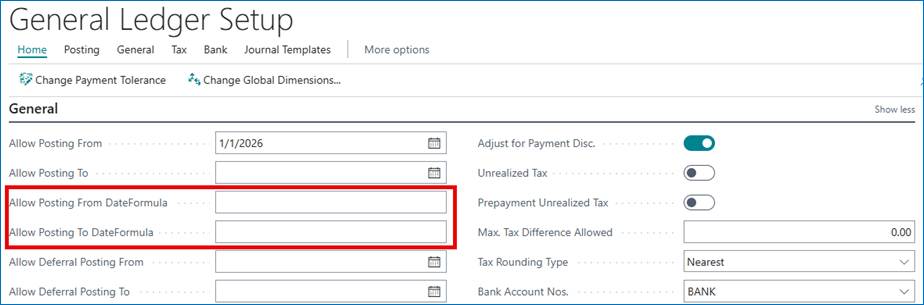
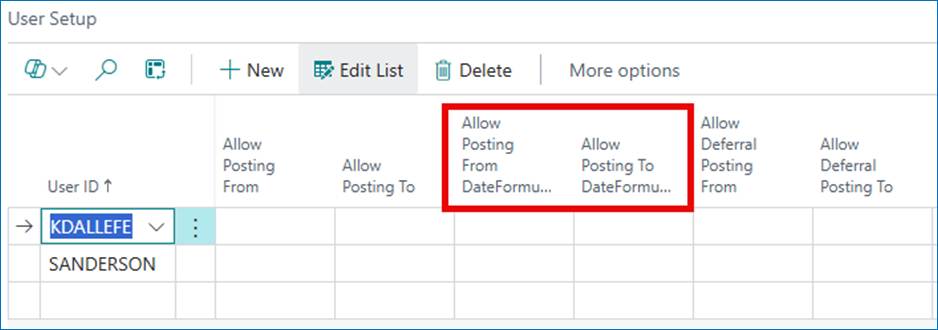
Business Central now supports date formulas for posting date controls:
- Allow Posting From Date Formula
- Allow Posting To Date Formula
These sit alongside the traditional fixed-date fields and use the same date formula syntax you already know from payment terms, recurring journals, and reminders. The difference is how they’re used: instead of calculating a due date, Business Central uses the formula to calculate the allowed posting window based on the work date.
You’ll find these fields in:
- General Ledger Setup
- User Setup
Why This Matters:
This is one of those “quiet” features that removes a lot of friction between accounting and other departments.
- No more monthly reminders. Set it once and stop rolling posting dates forward by hand.
- Fewer ‘I can’t post’ tickets. Posting dates don’t go stale anymore.
- More flexible controls. You’re no longer limited to “current month only” unless you want to be.
How It Works
Each time a user posts, Business Central evaluates the formulas against today’s date and calculates the posting window dynamically.
A few common examples:
| Scenario | From | To | Result – using 5/4/2026 |
| Current month only | -CM | CM | 5/1/26 to 5/31/26 |
| Rolling 30 days | -30D | 0D | 4/5/26 to 5/4/26 |
| One month back, one week forward | -1M | 1W | 4/5/26 to 5/11/26 |
| Previous month close | -1M-CM | -CM-1D | 4/1/26 to 4/30/26 |
| Today only | 0D | 0D | 5/4/26 |
The -CM to CM setup is likely the most common. It automatically opens posting for the entire current month and rolls forward without any manual intervention.
Quick syntax refresher:
- D, W, M, Q, Y = days, weeks, months, quarters, years
- C = current (for example, CM = end of current month)
- A leading – moves backward (for example, -CM = beginning of the current month)
Posting Date Priority (Same as Always)
The evaluation order hasn’t changed:
- User Setup
- General Ledger Setup
The only difference is that any of these levels can now use formulas instead of fixed dates.
Mixing Fixed Dates and Formulas
You don’t have to go all‑in on formulas. Each boundary is independent:
- Enter a formula → the fixed date clears.
- Enter a fixed date → the formula clears.
- Mix them when it makes sense.
Year‑end is a good example: lock Allow Posting From to January 1, but let Allow Posting To roll forward automatically.
Bottom Line
This won’t the make release‑note headlines, but it solves a problem nearly every Business Central finance team has dealt with. If you’re still manually updating posting dates—or fielding calls because someone forgot—date formulas are worth using.
For most environments, -CM to CM or -30D to 0D will cover what you need and let you stop thinking about posting dates altogether.
This should make so many Business Central users very happy! I know I am.