
Kim’s Korner · Hiding in Plain Sight, Article 5 of 7 | By Kim Dallefeld, Microsoft MVP
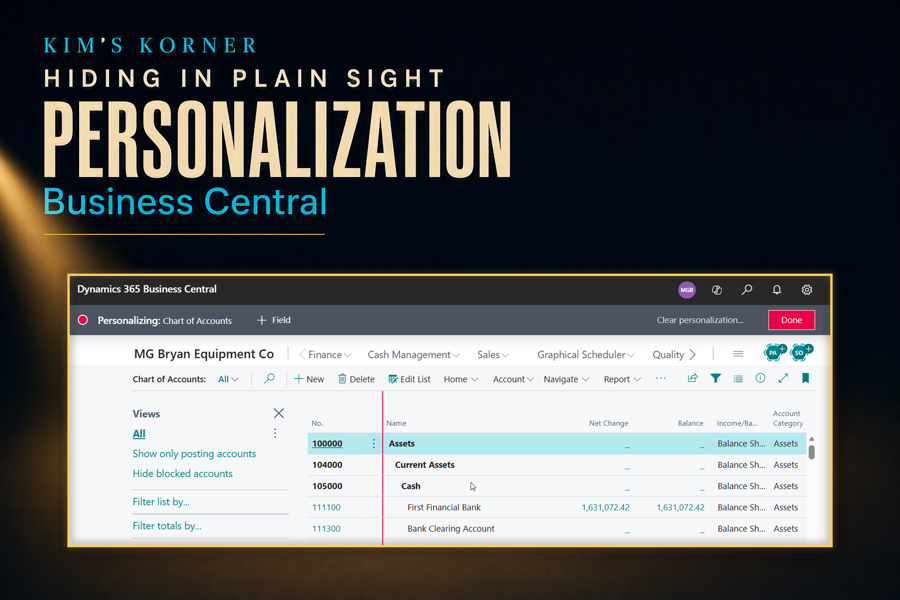
A support ticket arrives. The credit limit column is too far to the right on the customer list, and could someone please move it.
The ticket gets logged, prioritized, assigned, scheduled into a sprint, tested in sandbox, and released two weeks later. Total effort, counting everyone who touched it: perhaps three hours. Total time the user waited: fourteen days.
The user could have done it themselves in about eight seconds, and it would have changed the page for them and nobody else. The reason they did not is that nobody ever told them the difference between personalization and configuration.
The distinction that matters
Personalization changes the page for one user. Configuration changes it for a profile, meaning everyone assigned to that role. Same tooling underneath, entirely different blast radius, and the difference decides who is allowed to make the change and how much process it needs.
When a user personalizes, they are adjusting their own workspace. Nobody else sees it, nothing is at risk, and it can be reset in one click if they make a mess. When an administrator configures a profile, they are setting the starting point for a whole group of people, which deserves the care any shared change deserves.
Personalization covers more than most users expect:
- Move columns into the order that matches how you actually work
- Hide columns you never use, and show ones that are available but not displayed
- Move, hide, or collapse whole parts of a page, including FactBoxes
- Rearrange actions so the ones you use daily are easy to reach
- Adjust the role center to show the tiles and lists you care about
- Clear every change and return to the standard page whenever you want
The eight-second version of a two-week ticket
Back to the credit limit column. The user does not need a ticket, a sprint, or a sandbox. They need to know that the page they are looking at belongs to them.
The short path is this:
- Open the Settings menu and choose Personalize.
- Drag the column where you want it, or use the arrow to hide it entirely.
- Choose Done.
The banner across the top of the page while you are in personalization mode is the safety rail. It tells you plainly that you are changing your own view, and it gives you a way out. Nothing is saved anywhere else, and nothing you do here can affect a colleague.
When it should be configuration instead
Not everything belongs in personalization, and the judgment call is worth getting right. If every accounts payable clerk needs the same column added, doing it once on the profile is better than asking nine people to each do it themselves and hoping they all do it identically.
My rule is simple. If the change reflects how one person likes to work, let them personalize. If it reflects how the role should work, configure the profile so that new hires inherit it on their first day rather than discovering it in their third month.
There is a useful side effect to configuring the profile properly. A user’s personalizations sit on top of the profile, so a good profile means people are personalizing small preferences rather than repairing a page that was never set up correctly for their job.
Why this one changes the support queue
It removes an entire ticket category. Column placement, hidden fields, and page layout requests can leave the queue permanently once users know the page is theirs to arrange. That is not a small share of the tickets most teams receive.
It is genuinely safe. This is the objection I hear most, usually from administrators worried that users will break something. They cannot. Personalization affects one user’s display and reverses in a single click, which makes it one of the few things in an ERP you can encourage people to experiment with freely.
It improves the data people see. A user who has hidden the fifteen columns irrelevant to their job is looking at a cleaner page, and a cleaner page produces fewer mistakes. That benefit is harder to measure than ticket volume, and probably larger.
It surfaces real configuration problems. When several people personalize the same page in the same way, that is a signal the profile is wrong. Watching where personalization clusters tells you exactly what to fix at the role level.
Where I use it most
Onboarding, again. I show personalization during the first session now, right after Tell Me, because a new user who can arrange their own pages stops feeling like a guest in the system.
Document entry pages benefit the most in daily use. Sales orders and purchase invoices carry a lot of fields that a given company simply does not use, and hiding them speeds up entry while reducing the number of places a mistake can happen.
Role centers are the most underused of all. Most users accept whatever tiles they were given and never touch them again, even though the role center is the page they look at more than any other in the application.
Kim’s Quick Tip
Before you log a ticket to move a field, ask whether the change is for you or for everyone. If it is just for you, personalize it and get on with your day.
Final thoughts
Personalization is the feature users are most reluctant to touch, and the reason is cultural rather than technical. People are trained to believe that changing an ERP screen is dangerous, so they file a ticket for something they are fully entitled to do themselves.
Undoing that belief is worth more than the feature itself. A user who understands that the page belongs to them starts treating the system as a tool they can shape rather than a form they have to endure, and that shift shows up in everything else they do.
The distinction is the whole lesson. Your view, or everyone’s view. Once someone can answer that question, they know which changes they can simply make and which ones deserve a conversation.
How many of your open tickets are really just personalization?
#BusinessCentral #MSDyn365BC #Dynamics365 #Accounting #ERP #MicrosoftMVP